Creating a Conceptual Model
A conceptual data model is a high-level view of how key business entities relate to one another, and helps you understand the structure of your data before getting into technical details. By focusing on business concepts and relationships, a conceptual model enables you create a unified view of business entities early in planning.
It ensures clarity and shared understanding before moving to more detailed logical or physical designs. This is achieved via entity relationship diagrams.
Conceptual models include the following components:
-
Entities: Objects or concepts that represent data within the system.
-
Relationships: Associations between entities that define how they interact. You can create the following types of relationships in a conceptual model:
-
Identifying
-
Non-identifying
-
Many-to-many
-
To create conceptual models and objects, and define their relationships, follow these steps:
-
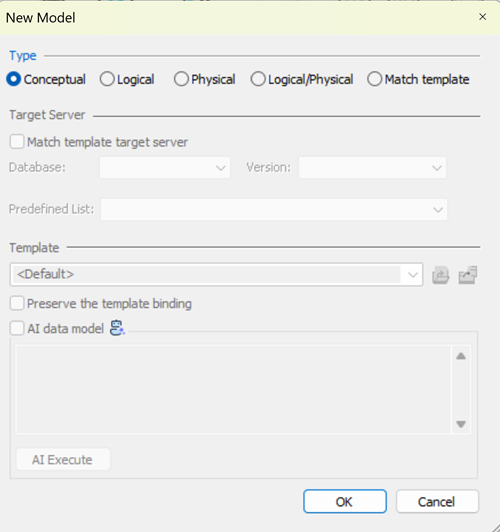
In erwin DM, click File > New.
The New Model screen appears.
-
Click Conceptual.
-
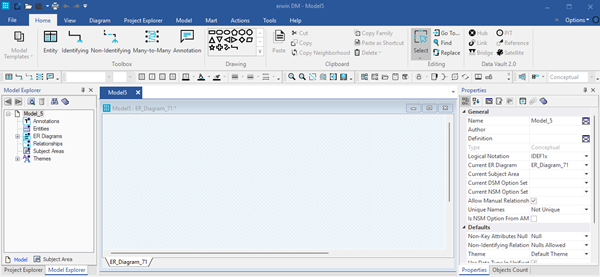
To create a blank conceptual model, click OK.
A blank conceptual model is created.
-
On the ribbon, click Home > Entity, and then click in the diagram window to add the entity.
Similarly, you can add more entities and relationships in the model. Entities and relationships can also be added from Model Explorer.
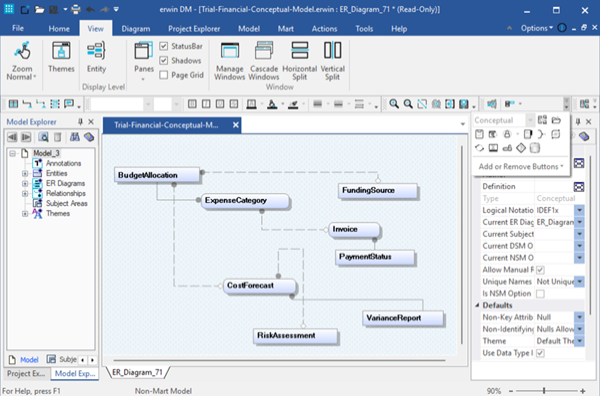
You can create, derive, and compare conceptual models. You can also generate reports using report designers. However, some capabilities aren’t supported for conceptual models.
Unsupported capabilities:
-
Model Template
-
Project Explorer
-
Spy
-
Query Tool
-
Forward Engineering
-
Target Database Change
-
MITI Bridges
-
Attribute Editor
-
Index or Keygroup Editor
-
Paste as Shortcut